






Live Chat

Domain Scan

(empty)

Login

The Mystery of DNS: Understanding How It Works
(28-apr-2025)
The Domain Name System (DNS) is often referred to as the phonebook of the internet. It plays a crucial role in connecting users to websites by translating domain names into IP addresses. Without DNS, users would have to memorize complex numerical addresses instead of easy-to-remember domain names like "example.lk".
Imagine trying to visit a website but needing to remember a long string of numbers instead of a simple name-this would make the internet almost impossible to navigate. DNS simplifies this process by acting as a bridge between human-readable domain names and machine-readable IP addresses. This system ensures that whenever you type a website's name into your browser, the correct server is found and the site loads seamlessly.
In this blog, we will explore how DNS works, the different ways to configure it, and how to manage your domain's DNS settings effectively. We will also discuss what happens when the connection breaks and how to prevent issues.
How DNS Works?
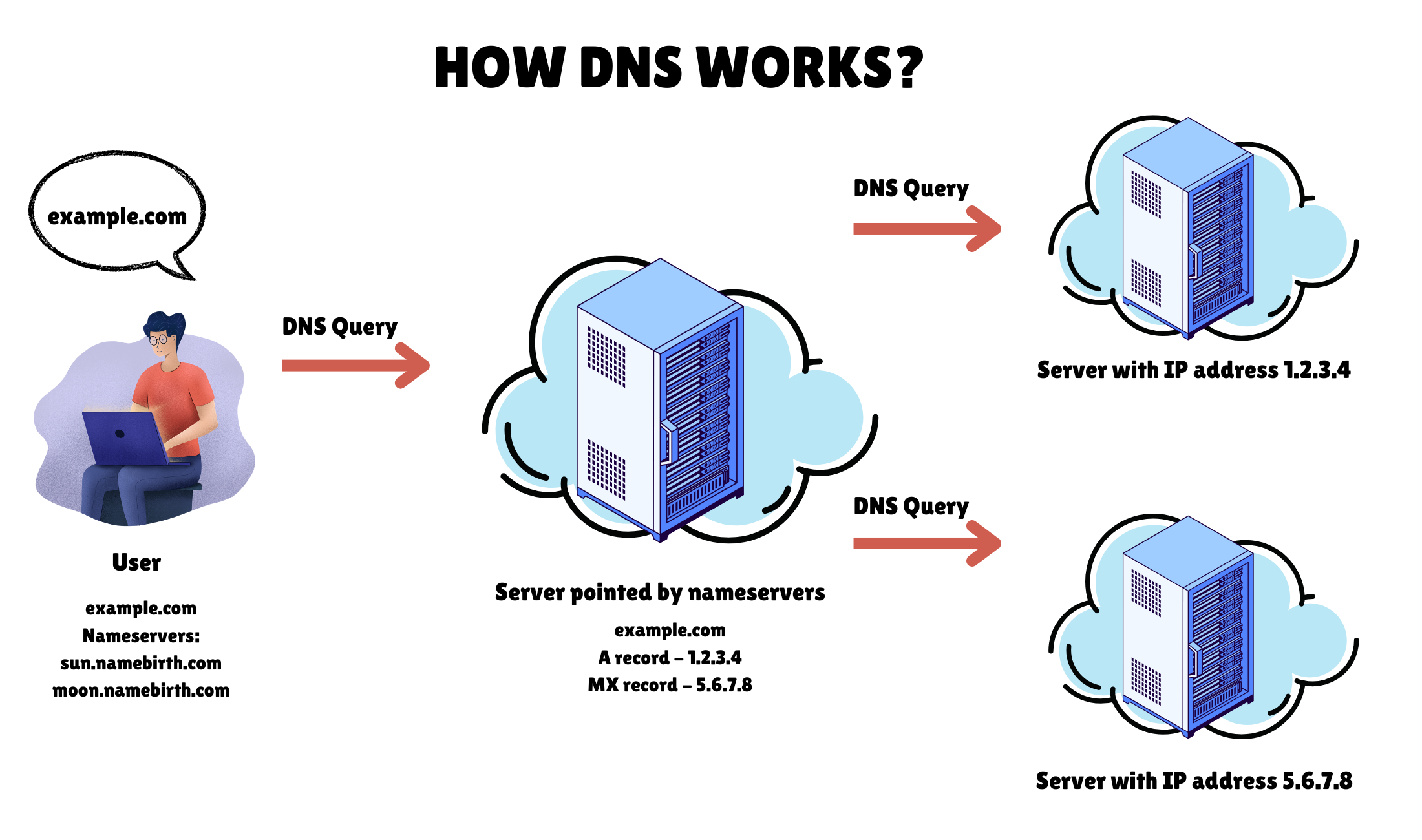
Every time you enter a website's name in your browser, a behind-the-scenes process takes place to connect you to the correct server. This process is known as a DNS query, which determines the right IP address for the domain.
- Querying the Server Assigned via Nameservers: The request goes to the server pointed by the domain's nameservers.
- If the DNS is managed on this server and the required record exists, it provides the IP address.
- If the DNS is managed on another server, the query is forwarded there to retrieve the necessary record.
- Connecting to the Website: Once the correct IP address is received, the browser establishes a connection with the hosting server and loads the website.
1. Using Register.lk's DNS Manager
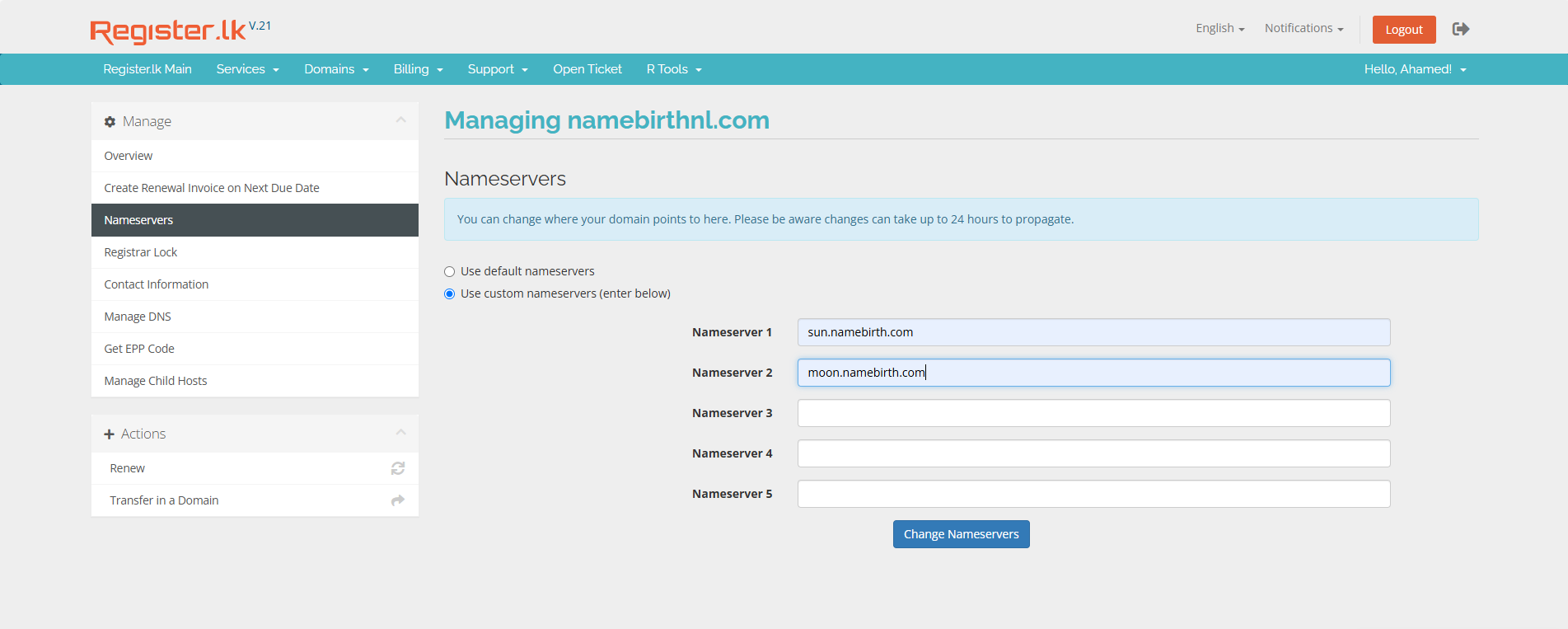
If your domain is registered with Register.lk and if you wish to manage your DNS records at the domain level instead of using nameservers and pointing to your hosting package, you can follow the below mentioned steps to manage your DNS record at the domain level:
- Log in to your Register.lk account
- Navigate to Domains > My Domains.
- Click on the dropdown menu next to your domain name.
- Select Manage Nameservers
- Choose 'Use custom nameservers (enter below)'.
- Enter the following nameservers:
sun.namebirth.commoon.namebirth.com- Click on 'Change Nameservers' to save the updates
Once the nameservers are updated, you can easily access and use the Manage DNS feature through Register.lk to manage and update your DNS records:
- Go to Domains in the menu bar
- Click on Manage DNS
- Find your domain and click the Edit Zone button next to it
This allows you to customize and configure various DNS settings, such as adding A records, CNAME records, MX records, and more, to ensure your domain is properly connected to the right services.
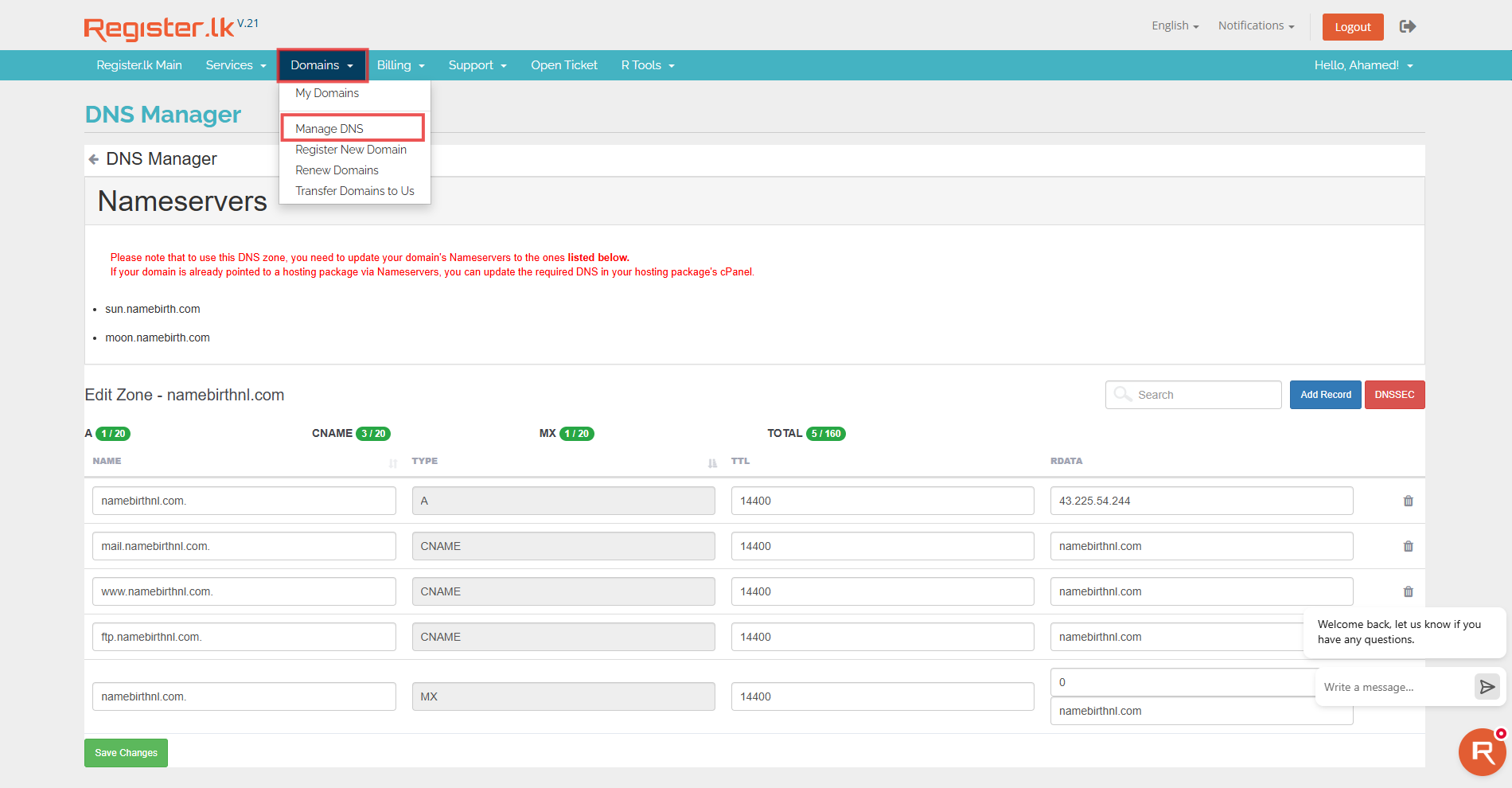
By managing your DNS directly at the domain level, you gain full control over where your website and services are pointed, ensuring flexibility and seamless performance.
2. Using Register.lk's Hosting Package and Managing DNS at the Hosting Level.
Alternatively, if you wish to point your domain to your Register.lk hosting package and manage your DNS records at the hosting level, you can update your domain's nameservers to those provided by Register.lk. This will allow you to manage your DNS settings directly through your Register.lk hosting account.
After the nameservers are added and the nameserver propagation is completed, you can follow the steps provided below and manage your DNS records in the cPanel of your hosting package.
- Log in to your cPanel
- Navigate to Domains > Zone Editor
- Click on "Manage" in front of your domain name
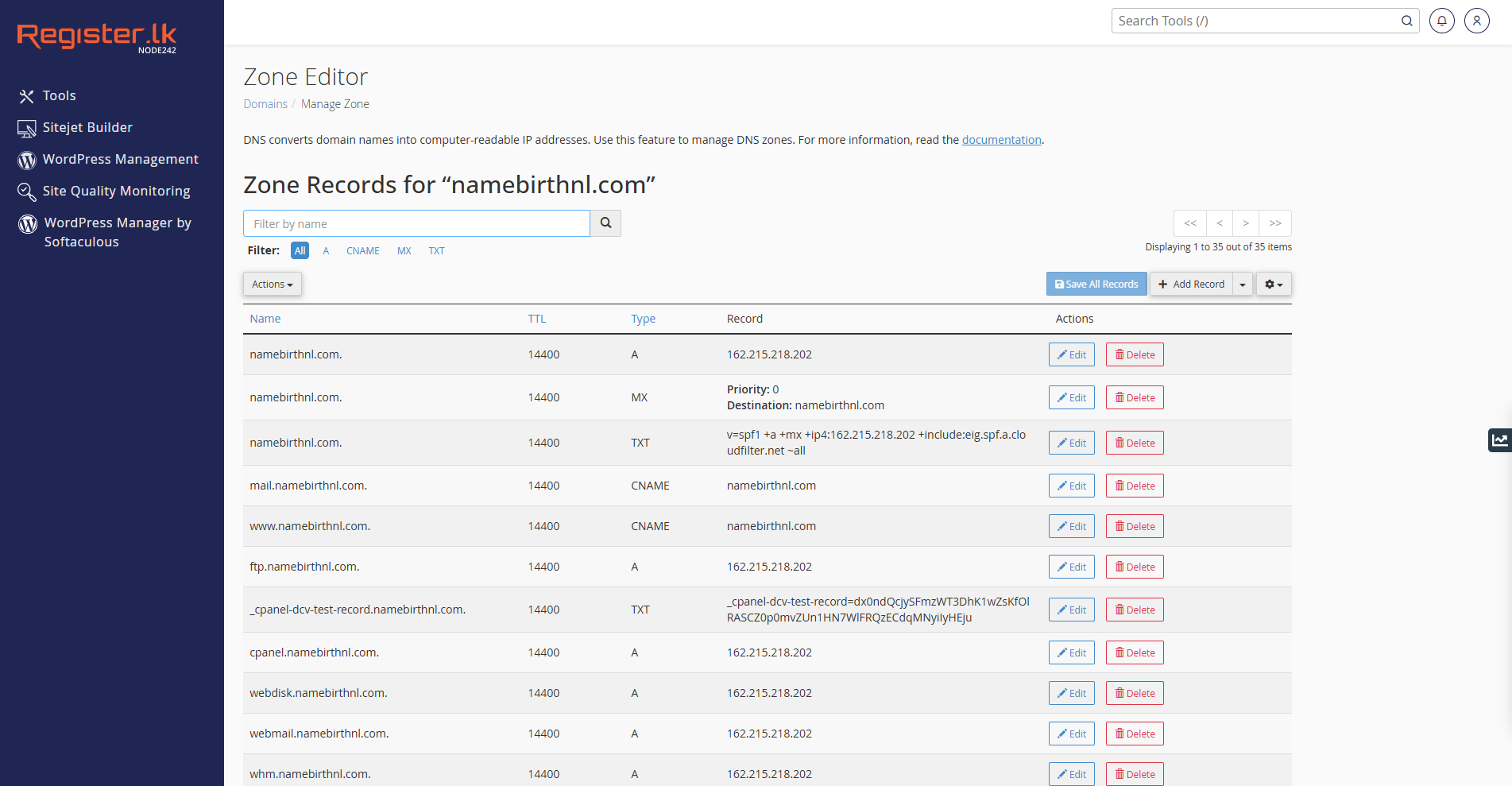
This method is ideal if you want an all-in-one solution where your hosting and DNS management are in one place, reducing complexity.
3. Managing DNS with a Third-Party Hosting Provider
Alternatively, if you have a third-party hosting provider and wish to manage your DNS records through their platform, you can update your domain's nameservers to those provided by your third-party hosting provider. Once you update the nameservers, all DNS management for your domain will be transferred to your hosting provider's DNS system.
This means that any changes to DNS records, such as A, CNAME, MX, and others, will need to be done directly through your third-party hosting provider's account. If you wish to manage DNS settings at the hosting level with your third-party provider, updating your nameservers ensures all DNS configurations are handled through their platform.
If your website is hosted elsewhere, ensuring proper DNS setup is critical to avoiding service disruptions and ensuring your domain always resolves correctly.
4. Using Cloudflare's Nameservers and DNS Manager
Cloudflare offers a free and highly reliable DNS service that can be used to manage your domain's DNS settings. When you update your domain's nameservers to the ones provided by Cloudflare, all DNS management for your domain will be handled through Cloudflare's platform. This includes the ability to manage various DNS records such as A, CNAME, MX, TXT, and more.
Once the nameservers are updated to Cloudflare, any DNS changes or configurations will need to be done through your Cloudflare account. If you'd like to learn more about managing your DNS records through Cloudflare, feel free to refer to our blog for a detailed guide on how to get started: How to Manage Your Register.lk Domain with Cloudflare.
What Happens If DNS is Not Managed Properly?
DNS mismanagement can lead to frustrating issues like website downtime, broken email services, and security vulnerabilities. Here's what can go wrong and how to avoid it:
- Incorrect Nameserver Configuration - If you update your domain's nameservers to the wrong provider or incorrectly configure them, your domain may not resolve correctly, and users will be unable to access your website. This could happen if the nameservers are not set to the ones provided by your hosting provider or DNS manager.
- DNS Records Updated in the Wrong Place - If DNS records are mistakenly updated in a location not specified by the active nameservers (for example, if your nameservers point to your hosting provider, but you update DNS records through a different DNS manager), the changes will have no effect. As a result, your website and other services (such as email) may not function correctly, potentially causing service disruptions or downtime.
- Misconfigured DNS Records - Updating the wrong DNS records, such as pointing the A record to an incorrect IP address or missetting CNAME records, can prevent your request from being directed to the correct server. This can cause site outages or errors for visitors trying to access the site.
- Propagation Delays After Incorrect Updates - If DNS records are updated incorrectly or in the wrong location, fixing them later may still lead to delays due to DNS propagation and potential conflicts. As a result, some users might temporarily be unable to access your website until these conflicts are fully resolved. This can lead to inconsistent user experiences, where some users can access the site while others cannot.
Conclusion
Managing your domain's DNS settings effectively is crucial for ensuring seamless website accessibility and optimal performance. Whether you choose to manage DNS at the domain level through Register.lk, configure it within your hosting package, use a third-party provider, or leverage Cloudflare's services, understanding how DNS works helps you make informed decisions. A well-managed DNS means faster website loading times, higher security, and uninterrupted online services. Whether you're running a business website or a personal blog, keeping your DNS settings optimized is key to success.
Take control of your domain's DNS today and ensure a faster, more secure, and seamlessly connected online experience with Register.lk!
 Written by: Register.lk Support Hero - Yusuf




 07-Aug-2026
 28-May-2026
 26-May-2026