






Live Chat

Domain Scan

(empty)

Login

How to Safely Share Access to Your Website with Your Developer
(30-jun-2025)

Handing your developer the keys to your website? Great! But hold on. Before you give away full access, let's make sure you're doing it smart and safe. Depending on your setup, there are several ways to do this. In this blog, we'll explore four common methods and explain which ones are most suitable based on access level, control, and security.
Access via Register.lk Account
Some users provide access by sharing their Register.lk account login, which allows the developer to access hosting, domain settings, and billing all in one place. It feels convenient, but it's like giving someone your master key, credit card, and front door password in one go.-
How to Add a User to Your Register.lk Account:
- Log in to your Register.lk account
-
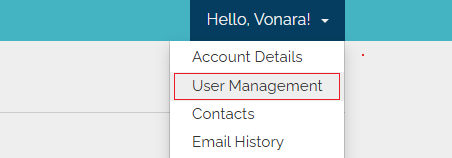
Go to Hello (User's name) on top right User management > Invite new user
-
You can add a user and also manage permissions.

Why It's Risky: This method gives the developer access to all your domains, hosting accounts, and billing details. It's best avoided unless the developer is part of your trusted internal team.
Share Direct cPanel Credentials
Another option is to provide your cPanel login credentials directly. This allows the developer to manage all hosting features including files, databases, emails, and more. You can access cPanel fromyourdomainname.com/cpanel Sharing your cPanel login gives full backend access, perfect for advanced tasks, but also risky if the developer isn't someone you trust completely.
Why It's Tricky: While this grants full backend access for advanced tasks, it also means the developer can make critical changes across your entire hosting account. Only use this if you're confident in their skills and intentions.
Grant FTP Access
FTP (File Transfer Protocol) allows the developer to access only your website's files, without touching emails, databases, or other sensitive settings.-
How to Create an FTP Account:
- Go to cPanel
- Navigate to FTP Accounts under the Files sections
- Create a new FTP account with a Username and Password
-
Set the Path to:
public_html(This limits access to website files only)
-
If You're Using FileZilla:
- Open FileZilla and enter the FTP username and password
- Set Host to your shared IP address (found on the right-hand side of the cPanel dashboard)
- Connect to the server and begin file transfers
Why Recommended: This method offers great control by limiting access to just the required folders. You can remove the account or change the password at any time, making it a safe and manageable way to give file-level access.
For further details, check out our guide: How to Transfer Files to Your Website via FTP.
Give WordPress Dashboard Access
Running a WordPress site? This is the cleanest and most efficient option. You can give your developer full access to the website without exposing your hosting or domain settings.-
How to do it:
-
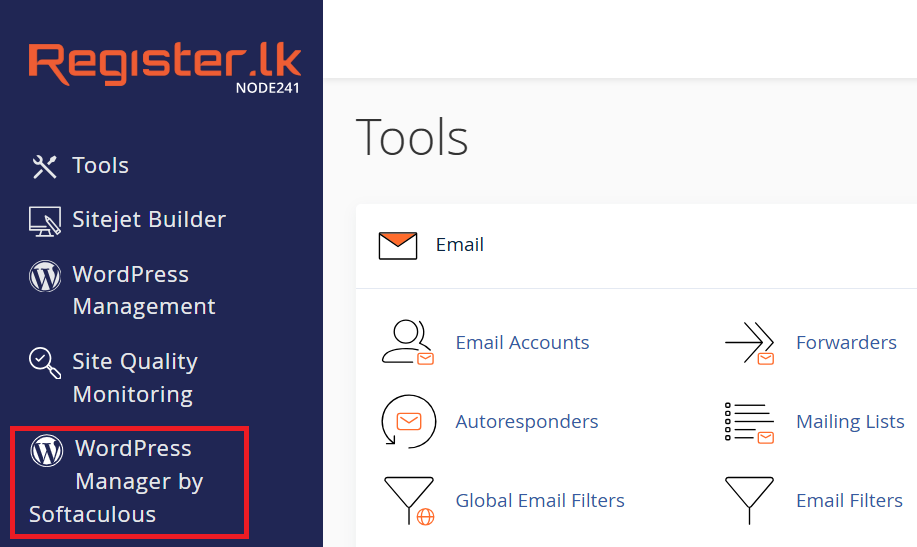
Log in to your WordPress Dashboard using the URL
yourdomainname.com/wp-adminor you can log in through cPanel:
-
Go to Users > Add New
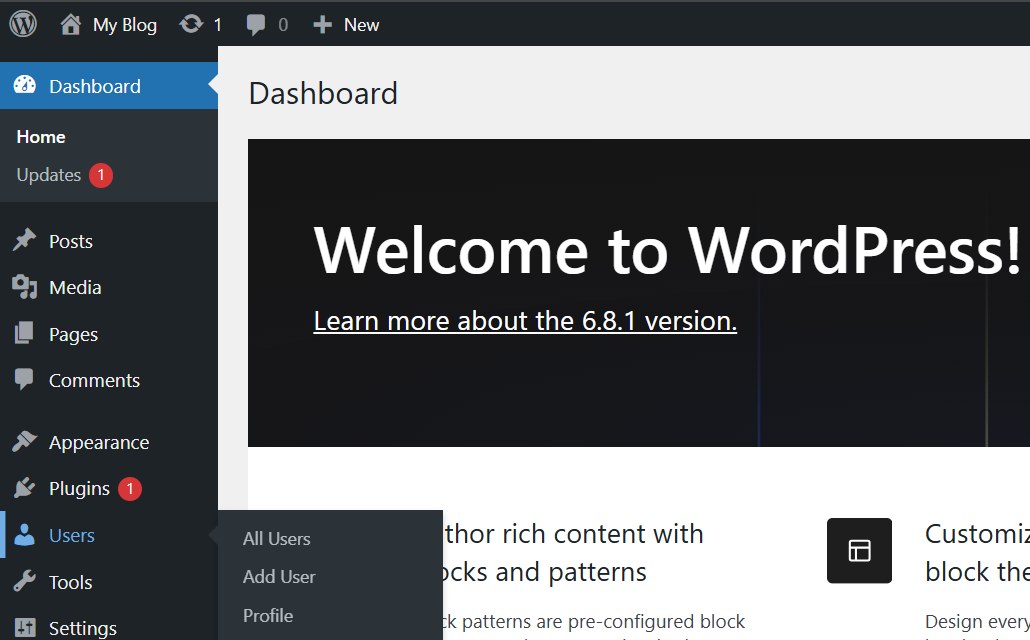
- Fill in the developer's email address
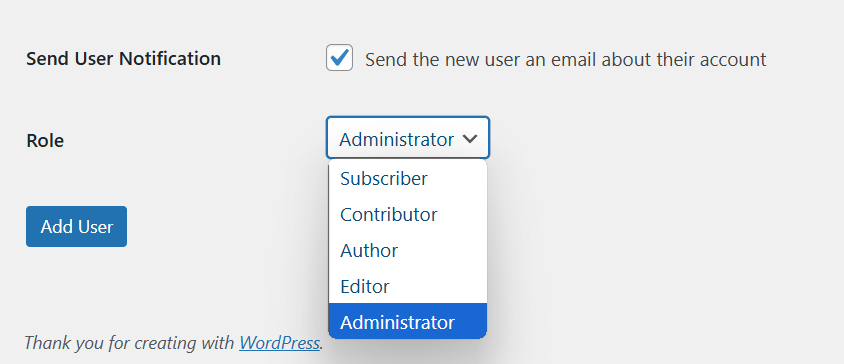
- Assign the Administrator role
-
Click Add New User
Why Recommended: The developer gets access only to the website, plugins, themes, settings, and content, without seeing any hosting or domain-related tools. You can monitor, edit, or revoke access anytime.
Conclusion
Choosing how to give your developer access isn't just about convenience, it's about control and security.-
Register.lk login, Not recommended: Gives access to everything including billing and DNS
-
cPanel credentials, Partially recommended: Backend access, but with full control over hosting
-
FTP access, Recommended: Limits access to website files only
- WordPress dashboard access, Recommended: Provides only site-level access, safe and reversible
Giving your developer access shouldn't feel like handing over the keys to your entire kingdom. The trick is choosing the right door.
 Written by: Register.lk Support Hero - Vonara



 28-May-2026
 26-May-2026
 05-May-2026
Safe & Secure Payments Accepted via: